Gateway Mail Servers
All email is sent through our gateway mail servers.
Log in to gateway.ipns.com using your email address and password to see your incoming and outgoing email record. If an email was blocked or quarantined, you will be able to see why, and release any email in quarantine, if needed.
More info:
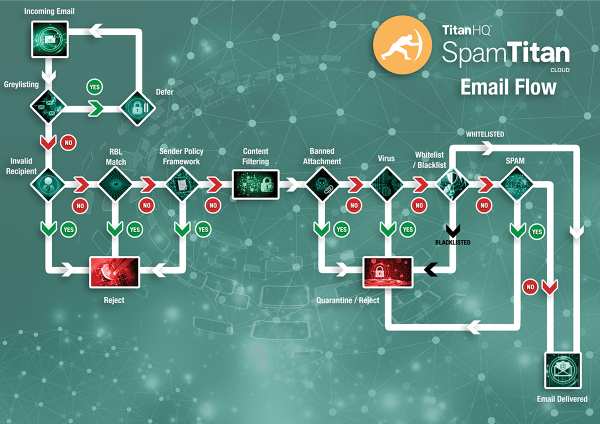
Because of continuing efforts by bad actors to infiltrate legitimate correspondence, spam controls are constantly updated to control unwanted and possibly dangerous spam/viruses. Our gateway mail servers (using SpamTitan software) manage our spam and virus protection.
Our gateway mail servers scan all incoming email for spam, viruses and Trojan horses while tracking all incoming and outgoing email. You can log in to gateway to review the mail history and delivery reports, and to manage your allow lists & block lists, quarantine, and your account and reporting settings. You can click on the link contained in your Spam Quarantine Report or go directly to gateway.ipns.com.
Log in with the email account and email password you want to manage. For example, if User wanted to check the status of outgoing email, she can log into gateway with her email address of user@her_domain.com and the related password and click on the 'Reporting' tab.
The figure below shows the mail flow to our gateway mail servers.